What this tool does
Matching labels for storage bins and baskets, for shelves, for drawers and toy boxes and pantry jars. Type one label per line. Add a contents line after a pipe character and it prints as a smaller subtitle underneath the title, which is what stops ART SUPPLIES from being a label that tells a seven-year-old nothing. Large gives three to a page, medium eight, small eighteen. Centred or left, a tinted heading band you can switch off, dashed cut guides.
People also used
Feedback
Spotted something off with this tool?
Type a list, get a matching set
One label per line. That is the whole interface, and it is what makes a set of twenty labels a two-minute job rather than an afternoon in a design app.
Add a pipe character and the line splits: TOYS | cars and figures prints TOYS large and bold with the contents underneath in smaller type. Use it where the title alone is ambiguous, which is more often than you would think. ART SUPPLIES tells a seven-year-old nothing; ART SUPPLIES with pens, paper, glue underneath tells them exactly where the glue goes back.
More labels than fit a page simply flow onto the next one.
Three sizes, and they are not interchangeable
- Large, three to a page. Toy bins and laundry baskets, garage tubs, anything at all that has to be readable from the doorway rather than from arm's length.
- Medium, eight to a page. The all-rounder, for shelf boxes and drawers and cabinet baskets.
- Small, eighteen to a page. Spice tins and small parts bins.
Size by the container rather than by how many you need. A small label on a large tub reads as an afterthought, and a large one on a spice jar wraps round the side.
Titles auto-shrink to fit their label width, so a long word like ORGANISATION stays on one line instead of running off the edge.
The coloured band, and when to turn it off
On by default, and it puts a tinted strip behind the title. It gives the eye something to lock onto at shelf height, which is exactly what you want on a wall of identical bins.
Off gives a clean all-white label, which is what you want when the labels are going on something that already has a colour scheme, or when they are being printed in quantity and the tint is costing ink. Alignment is centred by default and can go left, which reads better on a long shelf where labels sit in a row.
A playroom in fifteen minutes
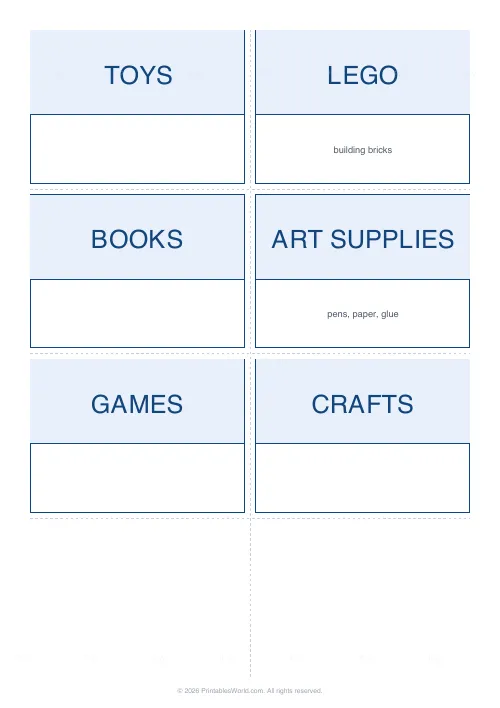
Six lines typed: TOYS, then LEGO with building bricks after the pipe, then BOOKS, then ART SUPPLIES with pens, paper, glue, then GAMES, then CRAFTS. Medium size, band on, cut guides on.
Printed on light card, cut along the dashed lines, taped to the front of each bin. The point is not that the room looks tidier. It is that a child can now put things away without asking where anything goes, which is the difference between a system that lasts a week and one that lasts a year.
Making them last
- Light card rather than paper, because a paper label curls off the front of a bin inside a month and then falls behind it.
- Full-sheet adhesive label paper if you want peel-and-stick, cut along the same guides.
- Clear tape over the top, or a laminating pouch, for anything going near a kitchen or a bathroom.
- Print at full scale. Fit-to-page shifts the guides.
- A craft knife against a metal ruler beats scissors on eighteen small labels.
FAQs
Quick answers
How do I add a contents line under the label title?
Type the title, a pipe character, then the contents on the same line. For example "ART SUPPLIES | pens, paper, glue". The title prints big and bold and the contents print smaller underneath. Leave out the pipe for a title-only label.
How many labels fit on a page?
It depends on the size you pick: large gives 3 per page, medium gives 8, and small gives 18. If you type more labels than fit, they flow onto extra pages automatically.
Can I print these on sticker or adhesive sheets?
Yes. Print on full-sheet adhesive label paper, then cut along the dashed guides. For paper or card labels, attach with tape or a glue stick, and cover with clear tape to make them wipe-clean.
Can I cut the labels out neatly?
Yes. Turn on dashed cut guides and faint lines run through the gutters between cells so you can cut straight with scissors or a craft knife. Keep printer scaling at 100% so the grid lines up with your cuts.
Related tools
Blank Invoice Template
A simple fill-in invoice you can print and complete by hand.
Blank Notebook Page
Plain page with a subtle border. No rules, no grid.
Lined Paper Generator
Generate custom ruled paper PDFs with adjustable line spacing, colours, margins, and primary ruling styles.
Graph Paper Generator
Create custom graph paper PDFs with square or rectangular grids, dot styles, and axis numbering.
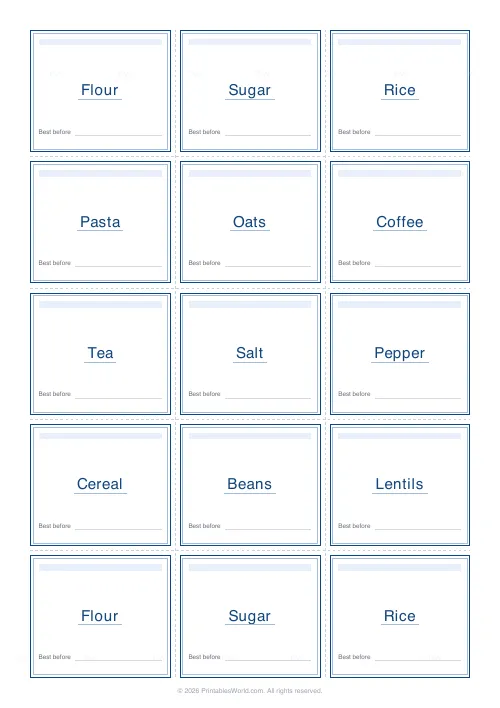
Jar & Pantry Labels Generator
Print a tidy sheet of cut-out labels for your pantry jars, spice rack and storage tins.
Further reading