What this tool does
A one-page reference on why screen colour and print colour differ, what converts cleanly and what does not, and when you need to worry about it.
People also used
Print Quality Reference Guide
A printable reference for DPI standards, paper weights, bleed defaults, and common pitfalls.
Ink Coverage Estimator
Estimate ink usage in millilitres and cost from CMYK page coverage.
DPI Calculator
Calculate DPI, print size, or required pixels for sharp, print-ready images.
Feedback
Spotted something off with this tool?
Two ways of making a colour
A screen emits light. Red, green and blue at full strength give you white, and all three off give you black — adding light makes things brighter.
Ink does the opposite. It absorbs light and reflects what is left, so cyan and magenta and yellow together approach black, and no ink at all leaves the paper white. Adding ink makes things darker.
That is not a technicality. It is why some colours simply cannot cross from one system to the other.
The colours that always disappoint
Vivid blues and bright oranges, above all. A saturated screen blue is produced by a pure emission that no combination of inks can match, so it comes back from the press muted — often noticeably purple.
Bright greens go the same way. If a brand colour matters, get a printed proof rather than approving it on a monitor, because no amount of care with the file fixes a colour that is outside what ink can do.
The K in CMYK
Black gets its own ink for practical reasons rather than theoretical ones. Mixing the other three gives a muddy dark brown, wastes a great deal of ink, and soaks the paper.
Hence a dedicated black plate, and hence the distinction between plain black (K alone) and a rich black that adds the other three underneath. Use plain K for body text — a rich black under small type produces coloured fringes wherever the plates misalign by a fraction. Use rich black for large solid areas, where plain K looks washed out.
When you can ignore all of this
Most of the time, honestly.
Home and office inkjets accept RGB and convert internally, and they do it well. Converting by hand before printing on one usually makes the result worse rather than better. This matters for commercial print, where a press expects CMYK and someone else's conversion decides how your colours land.
Ask the printer. Some want CMYK with a specific profile, some are happy to take RGB and convert it themselves, and theirs is the only answer that counts.
Your monitor is probably lying
An uncalibrated screen shows colours that are its own idea rather than anybody else's, so two people looking at the same file disagree about it in good faith.
Calibrate if colour decisions are part of your work. Otherwise, judge colour from a printed proof and treat the screen as a rough guide.
Related
The print quality guide covers DPI, paper weights and bleed on one card.
FAQs
Quick answers
Should I use CMYK or RGB?
Use RGB for anything viewed on a screen (web, social, video). Use CMYK for professional press printing. Home and office inkjets accept RGB and convert automatically.
Why do my prints look duller than my screen?
Screens emit bright RGB light, but ink (CMYK) has a smaller colour range. Vivid screen colours get mapped to the nearest printable colour, which can look slightly darker or less saturated.
Do I need to convert to CMYK for my home printer?
Usually no. Inkjet and laser drivers accept RGB and convert internally. Manual CMYK conversion mainly matters for professional press printing.
What is rich black?
A black made from a mix of CMYK inks rather than black alone. It prints deeper and more even than pure black ink for large solid areas.
Related tools
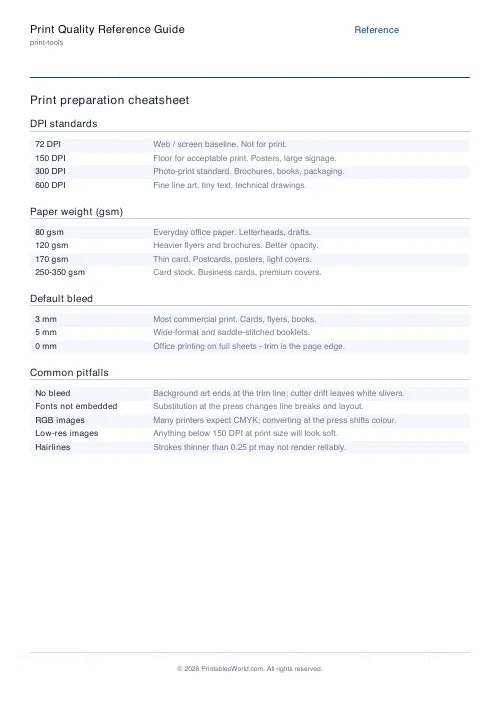
Print Quality Reference Guide
A printable reference for DPI standards, paper weights, bleed defaults, and common pitfalls.
Ink Coverage Estimator
Estimate ink usage in millilitres and cost from CMYK page coverage.
DPI Calculator
Calculate DPI, print size, or required pixels for sharp, print-ready images.